
On RouterOS 7, MikroTik hotspot vouchers can keep working after their time is up, because nothing on the router removes them. The fix is a small scheduled script on the router that deletes expired and used-up vouchers. Pikro, my free open-source hotspot manager, installs that script for you, and it runs on the router by itself.
I built Pikro because of this problem. A voucher you sold for 24 hours that still works three days later is revenue leaking out of the till, and most operators only notice when the numbers stop adding up.
Why it happens
A hotspot voucher has two separate limits, and people often mix them up:
- Connected time. « One hour of internet. » RouterOS counts this natively in the user’s
uptimeand enforces it with thelimit-uptimefield. When the two meet, the router itself refuses new logins. - Calendar validity. « Good for 24 hours after first use. » RouterOS has no built-in field for this on a hotspot user. Tools such as Mikhmon fake it with scripts: one marks the voucher at first login, another removes it later.
If that second script never runs correctly, the voucher is never deleted and the calendar limit is never applied. Mikhmon-style expiry has this reputation on RouterOS 7.
How to check if your router is affected
- Open a terminal in WinBox and run
/ip hotspot user print detail. Look for old vouchers with anuptimewell past what you sold, or a pile of users whose time should be long gone. - Run
/system scheduler printand/system script print. If nothing there removes expired hotspot users, nothing is cleaning up. - Run
/log print where message~"cleanup". A working cleanup logs a line each time it removes someone. - Check
/system clock print. Calendar expiry depends on the router’s clock (see the FAQ).
Fixing it by hand in RouterOS
The idea has two parts: stamp the expiry at first login, then delete expired users on a schedule. This is a simplified version of what Pikro uses, for RouterOS 7.12 or later. In the hotspot user profile, set on-login to this (replace 86400 with your validity in seconds):
:local now ([:tonsec [:timestamp]] / 1000000000)
:local uid [/ip/hotspot/user/find where name=$user]
:if ([:len $uid] > 0) do={
  :local c [:tostr [/ip/hotspot/user/get $uid comment]]
  :if ([:len $c] < 5 || [:pick $c 0 4] != "exp:") do={
    /ip/hotspot/user/set $uid comment=("exp:" . ($now + 86400))
  }
}
Then add a script under System, Scripts, named voucher-cleanup:
:local now ([:tonsec [:timestamp]] / 1000000000)
:foreach u in=[/ip/hotspot/user/find] do={
  :local c [:tostr [/ip/hotspot/user/get $u comment]]
  :if ([:len $c] > 4 && [:pick $c 0 4] = "exp:") do={
    :local e [:tonum [:pick $c 4 [:len $c]]]
    :if ($e > 0 && $e < $now) do={ /ip/hotspot/user/remove $u }
  }
}
And run it on a schedule:
/system scheduler add name=voucher-cleanup interval=1h on-event="/system script run voucher-cleanup"Give the script enough rights (read, write, policy and test). This handles calendar validity only. Removing vouchers whose connected time is used up means comparing uptime with limit-uptime, and RouterOS reports those in two different text formats (1h30m and 00:10:00). Parsing both correctly is the hard part !
How Pikro fixes it automatically
Pikro installs a scheduler entry on the router named pikro-cleanup. It detects your RouterOS version and picks the right script: one using Unix timestamps for 7.12 and later, one using date strings for RouterOS 6 and early 7. Each time it runs it removes a hotspot user in two cases only:
- the
exp:time in the comment is in the past, or - the user’s
uptimehas reached theirlimit-uptime.
It never removes a voucher that has no expiry marker and has not used up its quota, and it never touches a voucher nobody has used yet. Every removal is written to the router log with the reason.
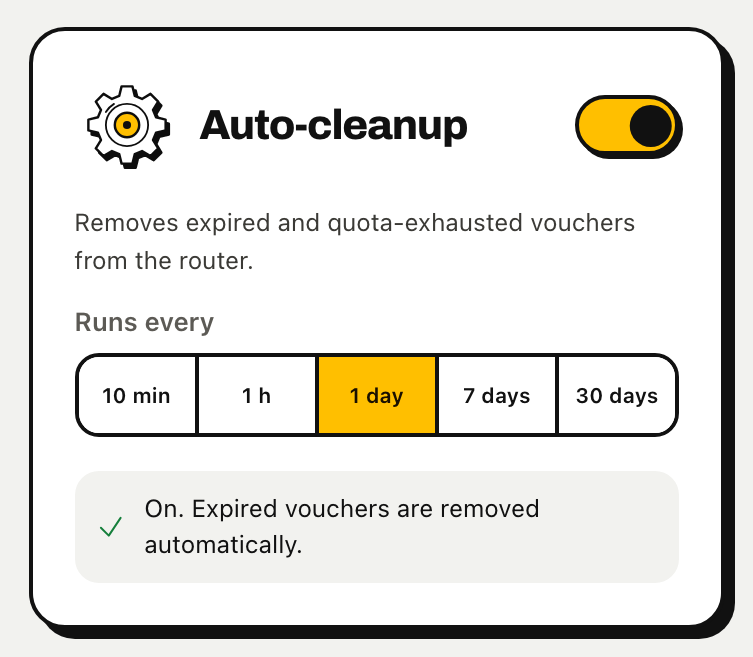
Because the scheduler lives in the router’s own configuration, it keeps running when Pikro is closed or your laptop is off. Pikro is needed to install it, change the interval or turn it off. You do all three from the Auto-cleanup card on the Dashboard: a switch turns it on or off (turning it off asks you to confirm), and under « Runs every » you pick 10 min, 1 h, 1 day, 7 days or 30 days. The removals show up in Hotspot, Logs, under the Cleanup filter.
One practical point: an expired voucher stays usable until the next run. With the 7-day default, that can be up to a week. If you sell day passes, choose 1 h or 1 day.
On RouterOS 7.17 and later, a router can refuse schedulers (its « device-mode »). If yours does, the card says so and shows the command /system/device-mode/update scheduler=yes. Run it in the WinBox terminal, then press the router’s physical button (or cold-reboot it) to confirm.
FAQ
Why do my MikroTik hotspot users never expire on RouterOS 7?
Calendar validity is not a native hotspot user field. It depends on scripts that mark and later delete the user, and if the deleting script does not run correctly, the voucher stays alive. A cleanup scheduler on the router fixes this.
What is the difference between limit-uptime and validity?
limit-uptime caps total connected time and is enforced by RouterOS itself. Validity is a calendar deadline counted from first use, which needs a script. You can use both, and either one ends the voucher.
Does expiry still work after the router loses power?
Connected-time limits do, because they do not depend on the clock. Calendar expiry does not always: many RouterBOARD devices have no battery-backed clock, so after a power cut the time can be wrong until NTP corrects it, which can delete vouchers too early or too late. A router with working internet time sync avoids this.
Pikro is free and open source (Apache 2.0). If you run a hotspot on MikroTik, see what Pikro does and get it here.